How Hackers Target Network Printers — And What They Can Do After Compromise?
- SWAPNESH CHOGLE
- Oct 7, 2025
- 5 min read

Network printers are everywhere: in offices, schools, hospitals, and even in home offices. They’re useful, inexpensive, and often under-protected. That combination makes them attractive entry points for attackers. This blog explains how attackers typically target network printers, what they can do when a printer is compromised, how to spot an infection and practical steps to protect your environment. Why printers matter in security Modern multifunction printers (MFPs) are basically small computers: they run operating systems, provide web interfaces, store scanned/printed documents and often have network shares, firmware update mechanisms, management ports and sometimes built-in storage. Because they’re “appliances,” they’re frequently overlooked in security programs—left on default settings, exposed to large networks or not regularly patched. That makes them useful targets for attackers who want stealthy footholds, data, or an internal pivot point. How attackers find network printers
Attackers generally look for devices that respond on known printer services or announce themselves on the network. Common high-level discovery methods include:
Network scanning: probing for hosts that respond to printer protocols (e.g., raw print ports, IPP, LPD, SNMP) to build a list of candidate devices.
Service advertising: many devices advertise themselves using discovery protocols (Bonjour/mDNS, SSDP, LLDP) which can reveal location and model.
Public exposure: some printers are accidentally reachable from the internet due to misconfigured firewalls or cloud VPNs.
Passive observation: monitoring network traffic (in an environment an attacker already has access to) can reveal printers and who talks to them.
These are conceptual discovery approaches, defenders can use the same ideas to monitor devices. Common vulnerability types
Below are the sorts of weaknesses attackers look for. This is what they exploit:
Default or weak credentials: many devices ship with default admin passwords or unchanged web-ui credentials. Attackers try common credentials and weak passwords.
Open management ports exposed to wide networks: admin interfaces, print queues, or debug ports left reachable beyond trusted management zones.
Unpatched firmware or software: appliances that haven’t received vendor updates can contain flaws that let attackers gain unauthorized control.
Insecure stored jobs / data at rest: printers with persistent storage may keep copies of printed or scanned documents (sometimes unencrypted).
Misconfigured access controls: exports or network shares that allow broad read/write access, or lack of root squashing/privilege mapping in file services.
Unrestricted protocols: cleartext or unauthenticated protocols (older printer protocols, SNMP v1/v2 with public community strings) that leak sensitive info or allow configuration changes.
Exposed diagnostic interfaces or debug features: functions used for maintenance that can be abused if reachable.
Inadvertent network exposure: printers placed on general user VLANs, cloud-facing printer services, or misrouted management traffic.
What attackers can do after they compromise a network printer
When an attacker gains sufficient control over a printer (or its administrative interface), a range of malicious actions becomes possible. Here are common post-compromise scenarios—again, described at a conceptual level:
1. Data leakage (sensitive document exposure)
Compromised printers can hold recent print jobs, scan archives, or cached files. Attackers may extract invoices, HR documents, contracts, medical records — anything printed or scanned. Such leaks can lead to regulatory fines, reputational damage, or direct fraud.
2. Lateral movement and internal reconnaissance
Printers are often on internal networks with meaningful visibility. An attacker with access to a printer’s management functions or firmware may learn about connected file servers, SMB shares, or other assets and use that information to move laterally to more valuable targets.
3. Credential harvesting and impersonation
Some printers integrate with directory services, LDAP, or authentication systems. If misconfigured or if management credentials are weak, attackers may discover administrative usernames, service endpoints, or even tokens that enable broader access.
4. Establishing persistence
Because printers are rarely rebooted and sometimes excluded from routine audits, attackers can install backdoors or modify firmware/configuration to retain access over long periods—making detection and remediation more difficult.
5. Launching attacks from a trusted device
An attacker can use a compromised printer as a staging platform to launch other attacks: brute-force attempts, service scans, or as a relay to access other internal hosts—sometimes evading perimeter defences because the printer is a trusted internal device.
6. Disruption (denial of service and sabotage)
Attackers can disable printing services, delete job history, or wipe stored data—disrupting business operations. In sensitive environments (e.g., hospitals), such disruptions can have real safety implications.
7. Supply-chain or file tampering
A sophisticated attacker might alter documents during printing (e.g., add or remove pages, change amounts on invoices) to facilitate fraud or mislead recipients.
8. Covering tracks / anti-forensics
Attackers can manipulate logs, delete evidence of access, or overwrite stored job histories to hide their activity.
Lets see a practical demonstration:
Step 1: Attacker scans the network to get a list of live IP addresses. From the list, attacker can identify the network printers by identifying the open ports. (9100, 515, 631, etc)
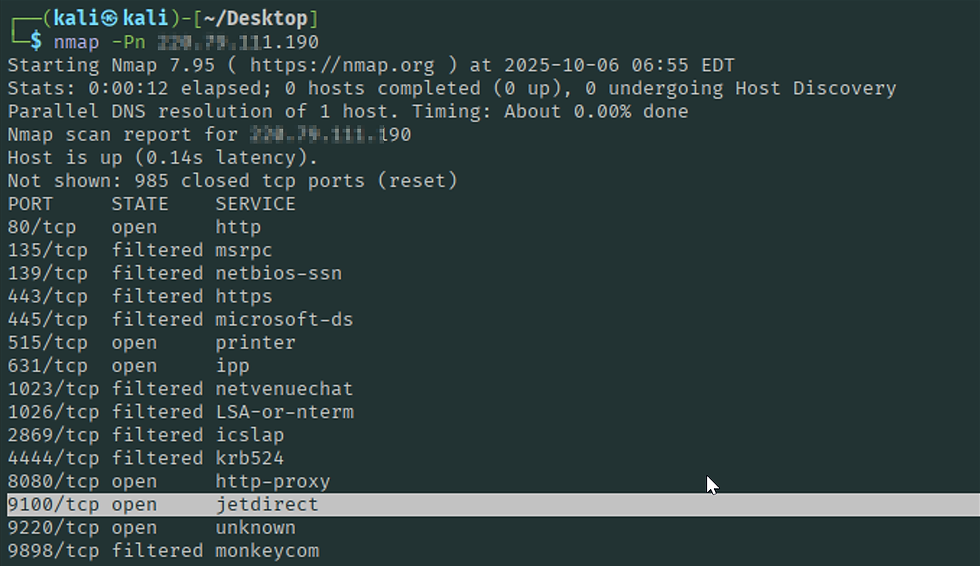
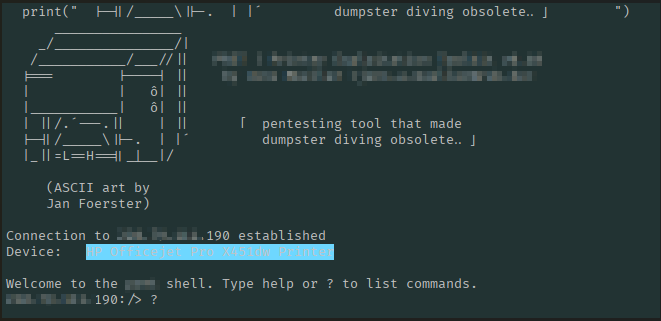
Step 2: As seen below attacker got a shell on the target network printer.
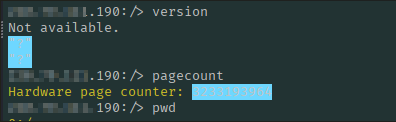
Step 3: Attacker can run different commands using the shell.
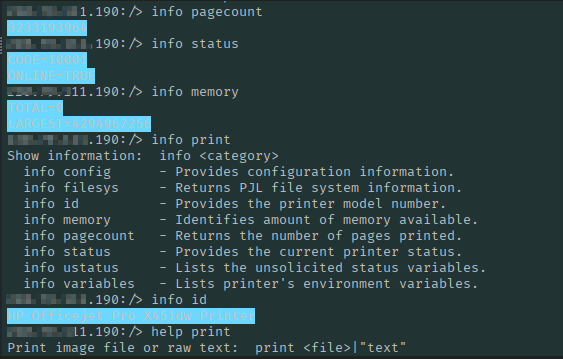
Step 4: Attacker can get access to the printer status, memory, etc. Attacker can also perform malicious activities like sending the print command to print unnecessary stuff leading to business impact.

Step 5: Attacker can perform attacks like DOS / Buffer Overflows to disrupt the printing service.

Step 6: Some network printers store data inside them like last printed documents which attacker can easily dump locally.

Step 7: Attacker can also remotely format the entire memory of the printer.

Signs a printer may be compromised (indicators of compromise)
Look for these non-technical signs; they may indicate malicious activity or misconfiguration:
Unexplained job history entries or large unexpected print volumes.
Changes in printer settings or unexpected reboots.
New or unknown administrative accounts.
Printer responding on unexpected ports or services you didn’t enable.
Users reporting printed documents that contain unexpected content or missing pages.
Network monitoring shows unusual connections from the printer to external IPs.
If you see these, treat the device as potentially compromised and follow your incident response procedures.
Practical prevention and hardening
Change default passwords. Set a strong, unique admin password for each device.
Isolate printers on their own VLAN or subnet. Limit access to only the systems and management hosts that need to talk to the printer.
Keep firmware up to date. Apply vendor updates according to the vendor’s guidance; track advisories for your models.
Disable or restrict unused services. Turn off protocols or functions you don’t need (e.g., FTP, Telnet, unsecured remote admin).
Use secure management: prefer authenticated, encrypted protocols (e.g., HTTPS, SNMPv3) where supported. Responding to a suspected compromise
If you suspect a printer has been compromised, follow these high-level steps (coordinating with your incident response team):
Isolate the device: Disconnect from the network or place on a quarantine VLAN to prevent further access.
Preserve evidence: Export logs, job histories, and configuration snapshots before making changes.
Investigate: Determine scope—what data was stored, which accounts were used, any signs of lateral movement.
Remediate: Reinstall firmware from trusted vendor images, change all credentials, and apply patches. Restore benign configurations from known-good backups where available.
Review and improve: Update firewall rules, adjust monitoring, and document lessons learned. Consider additional controls (network segmentation, stricter change management).
Balancing usability and security
Printers must remain usable: they support day-to-day operations. Hardening shouldn’t break workflows. Aim for a balanced approach:
Move print servers and sensitive printing workflows to controlled environments.
Provide secure methods for mobile printing (managed print solutions, authenticated release).
Train staff to treat printers as part of the security surface—don’t leave confidential documents unattended, and report odd printing behavior.


Very informative, and well explained.